weekly family plan to cut screen time
Conflict happens where there are no clear boundaries. Replace the arguments with a plan. The ‘just five more minutes’ battle is exhausting. This weekly planning system creates clear expectations so you never have to argue about tablets again.
Digital parenting in 2026 is a minefield. You are not just fighting your child’s willpower; you are fighting billion-dollar algorithms designed to keep them scrolling. Research from 2025 shows that 54% of parents believe their children are addicted to screens. It is not a lack of discipline. It is a lack of structure.
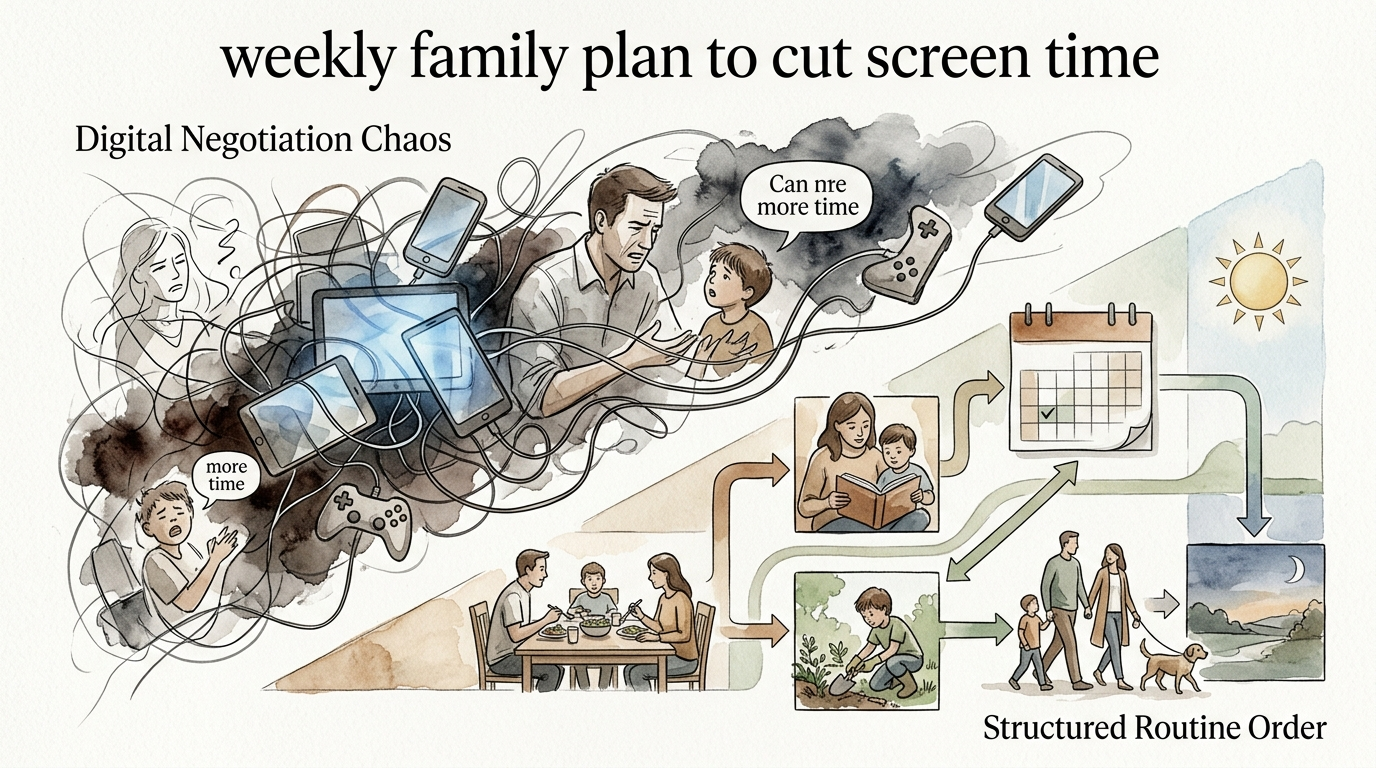
When you operate without a plan, every transition becomes a negotiation. You enter “Digital Negotiation Chaos,” where kids push for more time and parents give in because they are tired. Breaking this cycle requires a shift to “Structured Routine Order.” This article provides the roadmap to reclaim your living room and restore peace to your family.
weekly family plan to cut screen time
A weekly family screen time plan is a formal, written agreement that defines when, where, and how technology is used in your home. It is a proactive strategy to prevent conflict before it starts. Instead of reacting to a child who won’t put the phone down, you rely on a pre-negotiated schedule that everyone has already signed.
This system works because it removes the “parent vs. child” dynamic. The plan becomes the boss. When the timer goes off, you are not the “bad guy” for taking the tablet; you are simply following the agreement you made together on Sunday afternoon.
Real-world application of these plans has evolved significantly. In 2026, the American Academy of Pediatrics (AAP) moved away from strict hour-counting to a quality-and-context framework. This means your plan should focus on what screens are replacing—like sleep, physical activity, and face-to-face connection—rather than just the raw minutes.
Imagine your family’s time as a jar. If you fill it with “digital sand” first, there is no room for the “big rocks” of homework, chores, and sleep. A weekly plan ensures the big rocks go in first. It treats screen time as a high-value resource to be managed, not a default setting for boredom.
How to Build Your Weekly Screen Time System
Creating a system that sticks requires more than a verbal “no more YouTube.” You need a physical or digital anchor that the whole family can see. Follow these steps to build a bulletproof routine.
Conduct a Digital Inventory
Start by tracking current usage for three days. You might be shocked to find that the average 9-to-13-year-old now spends over three hours daily on screens, which is significantly higher than the recommended two-hour limit for that age group. Write down which apps are being used and when.
Hold a Calm Family Meeting
Schedule a time when no one is already upset about screens. Use this meeting to discuss the “why” behind the limits. Experts suggest framing the conversation around safety and well-being rather than punishment. Ask your kids what they want to achieve offline, whether it is learning a new hobby or spending more time with friends.
Create the Weekly Block Schedule
Divide your day into blocks rather than a list of tasks. This allows for flexibility while maintaining a rhythm.
- Morning Block: Focus on personal hygiene and “fueling” for the day. Screens are generally discouraged here as they can derail the morning momentum.
- School/Productive Block: Screens are used only for educational purposes.
- The “Big Rocks” Block: Homework, chores, and 60 minutes of physical activity must be completed before any entertainment screen time begins.
- Digital Free-Time: A dedicated window where kids can choose their content, provided it meets the family’s quality standards.
- The Power-Down Block: All screens go to a “charging station” at least 60 minutes before bed to protect sleep quality.
Use Visual Reminders
A written contract or a printed schedule on the refrigerator is essential. When a child asks for a device, you can point to the chart. This reduces “decision fatigue” for parents and provides a sense of predictability for children. Research indicates that routines help kids develop self-discipline and mastery over their own schedules.
The Benefits of Defined Digital Boundaries
The most immediate benefit of a weekly plan is the reduction in daily yelling. When expectations are clear, the “negotiation” phase of parenting disappears. However, the long-term advantages go much deeper into child development and physical health.
Improved Sleep and Mental Health
Sleep is the most powerful lever you can pull for a child’s well-being. A 2025 study published in JAMA Pediatrics found that excessive screen time in late childhood is directly linked to depressive symptoms in early adolescence, largely because screens displace high-quality sleep. By enforcing a “screens out of the bedroom” rule, you are directly protecting their mental health.
Physical Health and Posture
“Text neck” is a growing concern for pediatricians. Kids who spend hours hunched over tablets often suffer from back and neck pain similar to what surgeons experience after years of operating. A structured plan encourages kids to use desks or kitchen tables for screen use, promoting better posture and more frequent movement breaks.
Enhanced Social and Language Skills
Young children learn best through real-world interaction. Heavy solo screen use can delay language development because it reduces the number of “conversational turns” between a child and a caregiver. A plan that prioritizes face-to-face connection ensures that digital engagement doesn’t crowd out the social learning necessary for thriving in the real world.
Common Challenges and How to Avoid Them
Even the best plans face resistance. Understanding why these systems fail can help you prepare for the inevitable “digital distress” your kids might experience during the transition.
Parental Inconsistency
If you check your email during “no-screen family dinner,” your plan will fail. Kids are highly sensitive to hypocritical behavior. You must model the digital habits you want to see. If the rule is “no phones at the table,” it applies to parents as well.
The Dopamine Loop
Modern apps use “engagement-based design” to keep users hooked. Features like autoplay and infinite scroll are designed to bypass a child’s underdeveloped impulse control. When you tell a child to “turn it off,” they are literally fighting a chemical surge in their brain. Avoid this pitfall by giving 10-minute and 5-minute warnings before a session ends, allowing their brain to transition slowly.
Peer Pressure
As kids get older, their social lives move online. Banning screens entirely can lead to social isolation. Instead of a blanket ban, focus on “interactive screen time”—like video calling friends or playing collaborative games—rather than “passive screen time” like scrolling through short-form video feeds.
Limitations of the Weekly Planning Method
A weekly plan is not a “set it and forget it” solution. There are realistic constraints that will require you to adapt the system over time.
Age-Specific Needs
A plan for a 5-year-old will look vastly different from a plan for a 16-year-old. While toddlers benefit from strict limits (often no more than one hour of high-quality programming daily), teenagers need more room to practice digital autonomy. Rigid systems that do not evolve with the child’s maturity often lead to rebellion.
The “Emergency” Exception
Life happens. Sick days, long car rides, or high-stress work weeks for parents might necessitate more screen time than the plan allows. This is normal. The goal is a healthy “digital diet,” not digital starvation. As long as the exceptions don’t become the rule, your system will remain effective.
Routine Order vs. Digital Chaos
Choosing between a structured routine and a “no-plan” approach is often a choice between long-term harmony and short-term convenience.
| Feature | Digital Negotiation Chaos | Structured Routine Order |
|---|---|---|
| Primary Driver | Boredom or Parent Fatigue | Pre-set Family Values |
| Conflict Level | High (Constant Arguments) | Low (Clear Expectations) |
| Sleep Impact | Often Disrupted by Late-Night Use | Protected by “Power-Down” Rules |
| Skill Building | Low (Passive Consumption) | High (Time Management Skills) |
Practical Tips for Immediate Success
If you are ready to start today, these small adjustments can make a big difference in how the plan is received.
- Set Up a Tech Parking Lot: Designate a basket in a common area where all devices go when not in use. This prevents the “sneaky” use of phones in bedrooms.
- Use Hardware Controls: Don’t rely solely on willpower. Use router-level parental controls to automatically shut off the internet for specific devices at a certain time.
- Offer “Digital Swaps”: Instead of just taking a screen away, offer a high-value alternative. This could be a new board game, an art project, or 15 minutes of one-on-one “special time” with a parent.
- Audit the Content: Focus on “Kid-Safe AI” and educational platforms rather than engagement-heavy social media. Quality matters as much as quantity.
Advanced Considerations for Serious Practitioners
For those who want to go beyond basic limits, consider the “5Cs of Media Use” framework: Child, Content, Context, Connection, and Community. This advanced approach looks at how the media fits into the child’s entire ecosystem.
Scaling your plan for multiple children requires “Block Scheduling.” By staggering screen time windows, you can ensure that one child is doing homework while the other is using their digital free time. This reduces the “everyone is on a device at once” feeling in the house.
Serious practitioners also stay updated on “Digital Ecosystem” trends. In 2026, the rise of AI-assisted learning means that screens are more integrated into education than ever. Your plan should distinguish between “productive digital work” (like coding or digital art) and “extractive digital use” (like scrolling social feeds).
Example: A Typical Week in the “Structured Order” House
Let’s look at a realistic scenario for a 10-year-old student.
Monday – Thursday:
- 7:00 AM – 8:30 AM: Morning Routine (No Screens).
- 3:30 PM – 5:00 PM: Homework & Chores.
- 5:00 PM – 6:00 PM: Outdoor Play or Physical Activity.
- 6:00 PM – 7:00 PM: Dinner & Family Connection (No Screens).
- 7:00 PM – 8:00 PM: Earned Digital Free Time (Video games or shows).
- 8:00 PM: Device to the Parking Lot.
Friday – Sunday:
The digital window expands to two or three hours, allowing for a family movie night or longer gaming sessions with friends. Because the “big rocks” were handled during the week, this extra time feels like a reward rather than a source of guilt.
Final Thoughts
Building a weekly family plan to cut screen time is one of the most effective ways to lower the stress levels in your home. It replaces the exhausting cycle of “just five more minutes” with a predictable, fair system that everyone understands. You are not just limiting technology; you are creating space for the things that truly matter.
Start small. You don’t need a ten-page contract to see results. A simple, visible chart on the fridge and a consistent “screens out of the bedroom” rule can transform your family’s dynamic within a single week.
The goal is not to eliminate screens. Technology is a permanent part of our world. The goal is to ensure that screens serve your family, rather than your family serving the screens. Experiment with these boundaries, stay consistent, and enjoy the renewed connection with your children.
Sources
1 luriechildrens.org | 2 heyotto.app | 3 gethomsy.com | 4 parent.com | 5 recordablebookbuddy.com | 6 fmolhs.org | 7 healthychildren.org | 8 professional-organizer.com | 9 kidshubms.com | 10 focusedkids.org | 11 hopkinsmedicine.org | 12 pakeys.org | 13 healthychildren.org | 14 centerforonlinesafety.com | 15 screenagersmovie.com | 16 cambridgeclassical.org | 17 ckfamilyservices.org