
screen time tracker for kids
You can’t manage what you don’t measure. Move from guessing to precision with a real tracker. Most parents guess how much time their kids spend online. A precision tracker eliminates the arguments and gives kids visual ownership of their digital habits.
The digital world moves fast, and for parents, it often feels like trying to hold back a tidal wave with a plastic shovel. We know our children are spending hours on their devices, but the exact “how” and “where” remain a blurry mess of apps and algorithms. This lack of clarity is exactly where the friction starts.
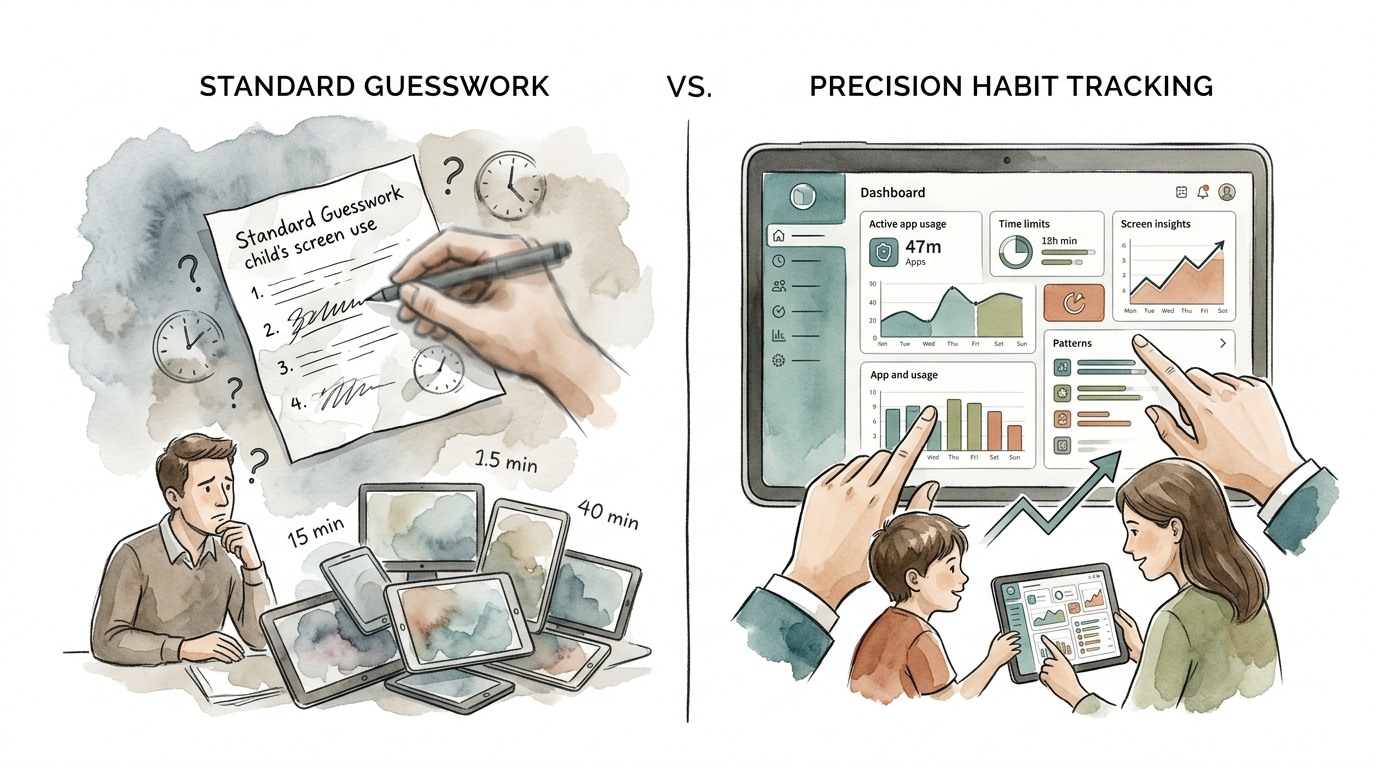
Traditional parenting often relies on Standard Guesswork. You see your child on their phone at 4 PM, again at 6 PM, and once more before bed. You assume they have been on it all day. They argue they just picked it up. This cycle creates a defensive environment where data is replaced by emotion. Precision Habit Tracking changes that dynamic entirely.
By moving to a system of objective measurement, you shift the conversation from “You are on that phone too much” to “The data shows three hours of social media today—how can we balance that tomorrow?” It is about empowering your child to understand their own digital consumption rather than just feeling policed. Let’s look at how to build that precision into your home.
screen time tracker for kids
A screen time tracker for kids is a specialized tool designed to monitor, report, and manage the amount of time a child spends on digital devices including smartphones, tablets, computers, and even gaming consoles. These tools go beyond a simple stopwatch; they categorize usage into educational, social, and entertainment buckets, providing a granular view of a child’s digital life.
In the real world, these trackers act as a digital speedometer. Just as a driver needs to know their speed to stay within the limit, a child needs to see their usage to learn self-regulation. Without a tracker, a child might feel like they have only been playing Roblox for twenty minutes when, in reality, two hours have vanished into the digital void. This “time blindness” is a common psychological phenomenon in the attention economy.
These trackers exist because the modern internet is designed to be “sticky.” Apps use variable reward schedules and infinite scrolls to keep users engaged as long as possible. A screen time tracker for kids serves as a necessary counter-friction. It provides the hard data parents need to enforce boundaries and the visual feedback kids need to develop a healthy relationship with technology.
How Modern Tracking Systems Work
Most parents believe screen time trackers are just simple “off switches,” but the underlying technology is more sophisticated. Depending on the device and the software you choose, tracking happens through one of three primary methods: API integration, VPN-based filtering, or local agents.
On Apple devices, third-party apps often use the Screen Time API. This allows apps like Qustodio or Norton Family to request usage data directly from the operating system. This is generally more privacy-friendly but can be more limited in what it can see compared to Android systems. Android allows for deeper integration through “Accessibility Services,” which can track specific keystrokes and even content within apps, though this requires more trust in the software provider.
VPN-based trackers work differently. Instead of looking at the device itself, they route all internet traffic through a private server. This allows the tracker to see which websites are being visited and which apps are communicating with the web, regardless of whether they are on Wi-Fi or cellular data. This is how tools like Bark can monitor social media interactions and flag potential issues like cyberbullying or self-harm without needing to “spy” on every single screen tap.
Device-level agents are small programs that run in the background of a PC or Mac. They monitor active windows and “focus time.” These are particularly useful for homeschooling or remote learning, as they can distinguish between a child working in a Google Doc and a child watching MrBeast videos in a hidden tab.
Benefits of Precision Data over Guesswork
The primary benefit of a dedicated tracker is the elimination of the “Screen Time War.” When the rules are governed by a neutral third-party—the app—the parent is no longer the “bad guy.” The app simply enforces the agreed-upon limit. This creates a more harmonious household where boundaries are respected because they are transparent.
Precision tracking also fosters Visual Ownership. When a child can see a countdown timer or a daily graph of their usage, they begin to understand that screen time is a finite resource. This is a critical life skill. In the workplace, we use project management tools to track our time; teaching children to do this with their digital habits sets a foundation for future productivity and mental health.
Furthermore, these tools provide actionable insights into a child’s interests. If a tracker shows a child is spending five hours a week on digital art apps, that is a data point a parent can use to encourage a real-world hobby, perhaps by buying them a physical sketchbook or enrolling them in an art class. Data-driven parenting allows you to support their passions while curbing their distractions.
Challenges and Common Pitfalls
The biggest challenge in using a screen time tracker for kids is the “Cat and Mouse” game. Children are often more tech-savvy than their parents and will actively look for loopholes. Common hacks include changing the device’s time zone to reset limits, using “incognito” mode to bypass web filters, or even factory resetting the device entirely to wipe the tracking software.
Another mistake is the “Set It and Forget It” trap. Parents often install a tracker and never look at the reports until a crisis occurs. For these tools to work, they must be part of an ongoing conversation. If the tracker is used as a silent surveillance tool, it can damage the trust between parent and child. When a child feels they are being watched but not guided, they are more likely to find ways to hide their activity.
Privacy is also a valid concern. Many third-party apps collect significant amounts of data on your child’s habits. It is essential to read the privacy policy of any tracker you use. Look for companies that encrypt data and do not sell it to third-party advertisers. Using native tools like Apple’s Screen Time or Google’s Family Link is often the safest bet for data privacy, even if they have fewer “bells and whistles” than paid third-party alternatives.
Limitations of Software Tracking
Even the most advanced screen time tracker for kids has physical and technical limitations. For instance, most trackers struggle to monitor content within encrypted apps like WhatsApp or Signal. They can tell you how long the app was open, but they cannot always tell you what was said. This is a critical distinction that parents must understand.
Trackers also cannot account for “Secondary Screens.” If your child has a smartphone with a tracker, but they spend three hours playing an unmonitored gaming console or a friend’s tablet, your data will be incomplete. A tracker is a piece of a puzzle, not the whole picture. It cannot replace physical supervision or the “device-free bedroom” rule.
Environmental factors also play a role. If your child’s school requires the use of a laptop or tablet for hours a day, the tracker may show “high usage” that is actually productive. Modern trackers are getting better at distinguishing between “Educational” and “Entertainment” time, but they still require a human eye to interpret the nuances of a busy school day.
Standard Guesswork vs Precision Habit Tracking
| Feature | Standard Guesswork | Precision Habit Tracking |
|---|---|---|
| Source of Data | Parental memory and “gut feeling.” | Device-level logs and app usage reports. |
| Conflict Level | High; leads to “You’ve been on too long!” arguments. | Low; the app enforces pre-set, neutral limits. |
| Kid’s Role | Passive and defensive. | Active ownership of their “time budget.” |
| Accuracy | Low; easily influenced by bias. | High; accounts for every minute. |
| Goal | Control and restriction. | Self-regulation and digital wellness. |
Practical Tips for Implementation
The best way to introduce a tracker is to frame it as a family experiment. Start by tracking everyone’s usage, including your own. When kids see that parents are also subject to the data, they feel less targeted. Use a “Data Review” night once a week to look at everyone’s stats and discuss what was worth the time and what was a “zombie scroll.”
- Use Tiered Rewards: Don’t just block the phone when time is up. Allow kids to “earn” more time by completing chores, reading, or playing outside.
- Schedule “Downtime”: Use the tracker to automatically lock non-essential apps 60 minutes before bed. This helps the brain produce melatonin without a nightly fight.
- Whitelisting is Better than Blacklisting: Instead of trying to block every bad site, start by only allowing the sites and apps you know are safe, then expand as they show responsibility.
- Check Battery Logs: If you suspect your child is bypassing the tracker, look at the battery settings in the device. It shows which apps used the most power, and those logs are much harder to fake.
Advanced Considerations: Beyond the Device
For parents who want a more robust solution, Router-Level Tracking is the gold standard. Instead of installing an app on every device, you manage the internet at the source. Routers like Gryphon, Circle Home Plus, or Asus with AiProtection allow you to set “Internet Bedtimes” for specific users. When the clock hits 9 PM, the internet simply stops working for the 10-year-old’s devices, while the parent’s laptop stays connected.
DNS filtering is another advanced technique. Services like NextDNS or Cloudflare for Families allow you to block entire categories of websites (like gambling, adult content, or “time-waster” domains) at the network level. This is effective because it works on any device that connects to your Wi-Fi, including guest devices and “smart” devices that can’t host their own tracking apps.
If you have a particularly tech-savvy teen, consider MAC Address Filtering. This ensures that only “approved” devices can join your network. If your teen tries to hide their usage by using an old phone you forgot about, the router will block it because its unique hardware ID isn’t on the “Allowed” list.
Real-World Scenario: The Saturday Morning Test
Imagine it’s Saturday morning. Without a tracker, the child wakes up at 7 AM and starts playing games. At 10 AM, you walk in and tell them to get off. They scream that they “just started.” You are frustrated because you think they’ve been on for three hours. The weekend starts with a fight.
With a precision tracker, the scenario changes. At 7 AM, the child starts their “Saturday Budget” of two hours. At 9 AM, the app sends a notification: “15 minutes remaining.” The child knows they need to find a natural stopping point in their game. At 9:15 AM, the game closes. They walk into the kitchen and ask what’s for breakfast. No yelling. No guessing. Just a system working as intended.
This transition from theory to practice is where the value lies. It moves the needle from monitoring a child to teaching a child. Over time, they stop looking at the tracker as a warden and start looking at it as a tool that helps them keep their life in balance.
Final Thoughts
Screen time trackers for kids are not about taking away the fun of the digital world. They are about providing the guardrails necessary for children to enjoy technology without being consumed by it. In an age where every app is fighting for your child’s attention, having a data-backed system is the only way to ensure they remain in control of their own habits.
Start small by using the tools already built into your phone. As you get comfortable with the data, you can explore third-party apps or router-level controls to fill the gaps. The goal is not perfection, but progress. Every minute saved from a mindless scroll is a minute gained for creativity, connection, and real-world growth.
Remember, the goal of a screen time tracker is eventually to not need one. You are building the muscle of self-regulation. By measuring today, you are giving your child the skills to manage their digital health for the rest of their lives. Experiment with these systems, involve your kids in the process, and watch the “Screen Time War” finally come to an end.
Sources
1 cnet.com | 2 youtube.com | 3 theguardian.com | 4 useboomerang.com | 5 forbes.com | 6 pcmag.com | 7 homebasemodern.com | 8 manhattanpsychologygroup.com | 9 reddit.com


One Comment
Comments are closed.