healthy amount of screen time
Stop using one-size-fits-all numbers. Precision tracking allows for more tech use where it matters and less where it doesn’t. The ‘Healthy Amount’ depends entirely on what you’re doing. Here is how to audit your screen time with precision to find your family’s sweet spot.
Most people feel a constant, low-grade guilt about their digital habits. You see the weekly report pop up on your phone, and that number—four, five, maybe six hours—feels like a personal failing. But a single number cannot capture the complexity of a digital life. Looking at total minutes is like counting total calories without distinguishing between a bowl of spinach and a bowl of sugar.
The conversation is shifting from “how much” to “how well.” We are entering an era of digital wellness defined by intent and precision. This guide will help you move past the anxiety of the clock and into a system where technology serves your goals rather than draining your focus.
healthy amount of screen time
The concept of a healthy amount of screen time has undergone a radical transformation in recent years. In the early days of the smartphone era, health organizations leaned on the “2-Hour Rule,” suggesting that any recreational use beyond 120 minutes was inherently damaging. Modern research, including the Goldilocks Hypothesis, suggests that the relationship between well-being and screen use is actually a curve. Total avoidance can be just as isolating as total immersion, while moderate, purposeful use often correlates with the highest levels of life satisfaction.
A healthy amount is now defined by three pillars: Quality, Context, and Connection. High-quality use includes activities that spark creativity, facilitate learning, or build genuine social bonds. Context refers to when and where the screen is used—a tablet used for a family recipe in the kitchen is different from a smartphone used in bed at midnight. Connection focuses on whether the device is bringing you closer to people or acting as a barrier to real-world interaction.
Real-world examples of healthy screen time include:
- Video calls with distant relatives that foster emotional proximity.
- Using educational platforms or AI-driven tools to learn a new skill or language.
- Collaborative gaming that requires strategic thinking and teamwork.
- Digital art creation or video editing that develops technical and creative proficiency.
In contrast, unhealthy use often involves “passive consumption traps.” These are designed with infinite scrolls and variable reward schedules to keep you engaged long after you have stopped enjoying the content. Precision tracking helps you identify these leaks so you can reclaim your time for the things that actually provide value.
How to Conduct a Precision Screen Time Audit
Shifting to a precision model requires data. You cannot manage what you do not measure, but you must measure with nuance. Follow these steps to perform a deep-dive audit of your digital ecosystem.
Step 1: Categorize Your Apps
Open your device’s built-in tracking tool—Screen Time on iOS or Digital Wellbeing on Android. Do not just look at the total. Instead, group your apps into four specific buckets:
- Utility/Production: Maps, banking, work emails, calendars, and smart home controls. This time is often “neutral” and necessary.
- Active Creation/Learning: Duolingo, Khan Academy, Photoshop, or even a notes app for journaling. This is “high-value” time.
- Social Connection: Direct messaging and video calls. This is “connection” time.
- Passive Consumption: Short-form video scrolls, mindless news feeds, and autoplay streaming services. This is the “drain” time.
Step 2: Identify the “Zombies”
Look for the apps that have the highest “pick-up” count. If you pick up your phone 80 times a day, which app is the first one you open? Often, we open an app out of muscle memory rather than a conscious decision. These are your “zombie” apps. Precision tracking reveals the gap between your intended use and your actual behavior.
Step 3: Analyze the “Vampire Hours”
Check your usage by time of day. Usage during the hour before sleep or the first hour after waking has a disproportionate impact on your mental health and circadian rhythm. A healthy amount of screen time at 2:00 PM can become a toxic amount at 11:00 PM. Precision auditing focuses on these critical windows.
Step 4: The 7-Day Observation
Track your habits for a full week without changing anything. Use a notebook or a spreadsheet to jot down how you feel after using certain apps. Do you feel energized after a 20-minute Minecraft session with your kids, but drained after 20 minutes on a news aggregator? This qualitative data is the “precision” part of the dashboard.
Benefits of Precision Tracking
The primary advantage of this approach is the elimination of digital guilt. When you stop viewing all screen time as “bad,” you can enjoy high-value digital activities without the nagging feeling that you should be doing something else. You realize that a three-hour session coding a website is a productive achievement, not a failure of self-control.
Precision tracking also leads to better cognitive recovery. By identifying and cutting out passive consumption, you free up “mental bandwidth.” Your brain needs periods of low stimulation to process information and foster creativity. Reducing the “drain” time allows your prefrontal cortex to rest, improving your focus during work hours.
Other measurable benefits include:
- Improved Sleep Architecture: By targeting the “vampire hours,” you reduce blue light exposure and cortisol spikes before bed, leading to deeper REM sleep.
- Enhanced Social Presence: When you know exactly which apps are “zombies,” you can set hard limits that prevent you from reaching for your phone during dinner or face-to-face conversations.
- Intentional Parenting: Instead of fighting over total minutes, parents can guide children toward active creation. This builds a healthier long-term relationship with technology.
Challenges and Common Mistakes
The most frequent error is treating all hours as equal. A common mistake is feeling “productive” because you spent four hours on a tablet, even if those four hours were spent in a social media comment war. Conversely, people often feel guilty for spending six hours on a computer when five of those hours were spent writing a novel or managing a business. Context is the king of precision tracking.
Another pitfall is the “Rebound Effect.” This happens when you set overly restrictive, arbitrary limits (like “no screens after 6:00 PM”) without a plan for what to do instead. The brain hates a vacuum. If you don’t replace the digital dopamine with a physical or social activity, you will likely crash back into your old habits with even more intensity.
Ignoring the “Phantom Usage” is a subtle challenge. This includes background audio, like leaving YouTube running while you clean, or “second-screening,” where you scroll on your phone while watching TV. This splits your attention and prevents your brain from ever fully engaging with a single task, leading to a state of permanent “continuous partial attention.”
Limitations and Realistic Constraints
Precision tracking is a powerful tool, but it is not a magic wand. There are realistic boundaries to consider. For many professionals, the “Healthy Amount” of screen time is dictated by the requirements of their job. If you are a software engineer or a digital marketer, your baseline usage might be eight hours a day before you even consider personal use. In these cases, the “audit” must focus exclusively on non-work hours.
Environmental factors also play a role. During extreme weather or in areas with limited safe outdoor spaces, screens often become a necessary tool for education and socialization. Expecting a family to adhere to strict “outdoor-only” play in the middle of a heatwave or a blizzard is impractical. Precision tracking allows for seasonal and situational flexibility.
Neurodivergent individuals may also have different needs. For some on the autism spectrum or those with ADHD, certain digital activities can serve as vital tools for self-regulation, stimming, or cognitive “body doubling.” In these instances, what looks like “excessive” use to an outsider may actually be a functional coping mechanism. A precision approach respects these individual differences rather than imposing a neurotypical standard.
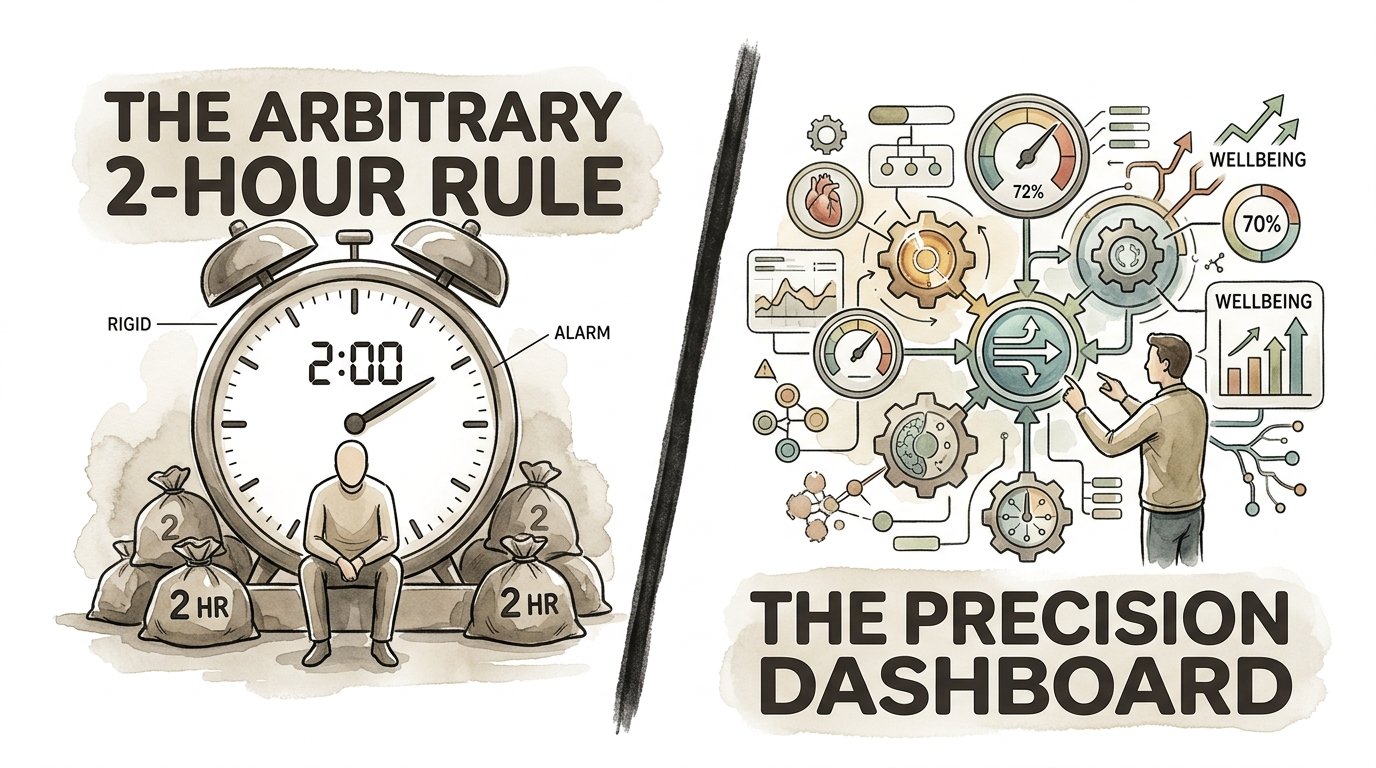
The Arbitrary 2-Hour Rule vs. The Precision Dashboard
To better understand the shift in philosophy, consider how these two approaches handle different scenarios.
| Feature | The Arbitrary 2-Hour Rule | The Precision Dashboard |
|---|---|---|
| Primary Goal | Minimize total minutes. | Maximize value and intent. |
| Categorization | None; all screens are “bad.” | Distinguishes active vs. passive. |
| Flexibility | Rigid and stress-inducing. | Adaptive to work and lifestyle. |
| Mental Impact | Guilt-based. | Awareness-based. |
| Success Metric | Staying under the limit. | Higher quality of life. |
Practical Tips for Digital Optimization
Once you have your audit data, use these techniques to fine-tune your environment. These are actionable steps to reduce the “drain” without losing the “value.”
- Turn on Grayscale: Most apps use bright, warm colors to trigger dopamine responses. Moving your phone to grayscale (found in Accessibility settings) makes the infinite scroll significantly less rewarding for your brain.
- The 20-20-20 Rule: To mitigate the physical impact of screen time, every 20 minutes, look at something 20 feet away for 20 seconds. This reduces eye strain and helps reset your focus.
- Create Physical “No-Tech Zones”: Designate the dining table and the bedroom as screen-free areas. This forces a transition from digital to physical presence without needing to check a clock.
- Batch Your Notifications: Use “Scheduled Summary” on iOS or similar tools to deliver all non-urgent notifications at once (e.g., at 12:00 PM and 5:00 PM). This prevents the “slot machine” effect of constant pings.
- Audit Your “Follow” List: If an account consistently makes you feel anxious, annoyed, or inadequate, unfollow it. Precision tracking includes auditing the emotional input of your feeds.
Advanced Considerations: The Neurochemistry of the Screen
For those who want to master their digital habits, it is helpful to understand why certain apps are so hard to put down. Most social media platforms use variable reward schedules—the same mechanism used in slot machines. You don’t know if the next scroll will provide a hilarious video, a meaningful message, or a boring ad. This uncertainty keeps the dopamine loop running.
Another advanced concept is Cognitive Load Theory. Every notification and app switch requires a “switch cost.” Your brain takes time to refocus on a task after being interrupted. Over time, high screen usage with frequent switching leads to “cognitive fragmentation,” where it becomes difficult to engage in deep, focused work. Precision tracking isn’t just about time; it’s about protecting your ability to think deeply.
Finally, consider the Circadian Rhythm and Melatonin Suppression. It is not just the content of the screen that matters, but the light itself. Short-wavelength blue light suppresses melatonin production more than any other color. Even if you are reading a “healthy” e-book, doing so on a bright screen at night can delay your sleep onset by hours. Using “Night Shift” or “Blue Light Filters” is a good start, but physical distance and lower brightness are more effective.
Examples and Scenarios
Let’s look at how two different people might apply these principles to find their healthy amount of screen time.
Scenario A: The Remote Freelancer
Mark spends 9 hours a day on his laptop for work. Under the “2-Hour Rule,” he would be a disaster. However, with precision tracking, Mark identifies that 8 of those hours are High-Value Production. His audit reveals that his real problem is the 90 minutes of “revenge bedtime scrolling” he does at night to decompress. By setting a hard limit on his social media apps at 9:00 PM and replacing the scroll with a Kindle (E-ink, not a tablet), Mark improves his sleep and morning productivity without changing his work hours.
Scenario B: The Student
Sarah uses her tablet for 5 hours a day. Her parents were worried until they performed a Precision Audit. They discovered that 3 hours were spent on Procreate (Digital Art) and 1 hour was spent on a Discord server for a coding club. Only 1 hour was “Passive Consumption” on TikTok. Instead of cutting her time, they encouraged her art and coding, but helped her set a 30-minute timer for TikTok to prevent the “scroll hole.”
Final Thoughts
Finding a healthy amount of screen time is an ongoing process of adjustment, not a final destination. As your life changes, your digital needs will evolve. The goal of precision tracking is to give you the data and the agency to make those adjustments without shame. When you treat your time as a finite, precious resource, you naturally start to spend it on things that provide a genuine return on investment.
Technology is a powerful tool for connection, education, and creativity. By auditing your habits and focusing on quality over quantity, you can harness that power without becoming a servant to the algorithm. Start your audit today by picking one “zombie” app and setting a conscious boundary. You might find that the world looks a lot clearer when you’re not viewing it through a constant, filtered haze.
If you found this audit helpful, consider exploring related concepts like “Digital Minimalism” or “Deep Work” to further refine your focus and productivity in a distracted world.
Sources
1 medium.com | 2 wisc.edu | 3 choc.org | 4 techhealthyfamilies.com | 5 childrenandscreens.org | 6 memtime.com | 7 harvard.edu