screen time challenge
Banning screens creates resentment. Precision creates habits. A screen time challenge shouldn’t be a punishment. It’s an exercise in precision. Learn how to schedule your digital life so you have more time for what actually matters. #ScreenTimeChallenge #TimeManagement #ParentingDoneRight

You probably reached for your phone before your eyes were even fully open this morning. Most people do. It’s the modern reflex.

We live in a world designed to keep us scrolling. Every notification is a dopamine hit. Every infinite feed is a trap. If you feel like your day is slipping through your fingers, you aren’t alone.
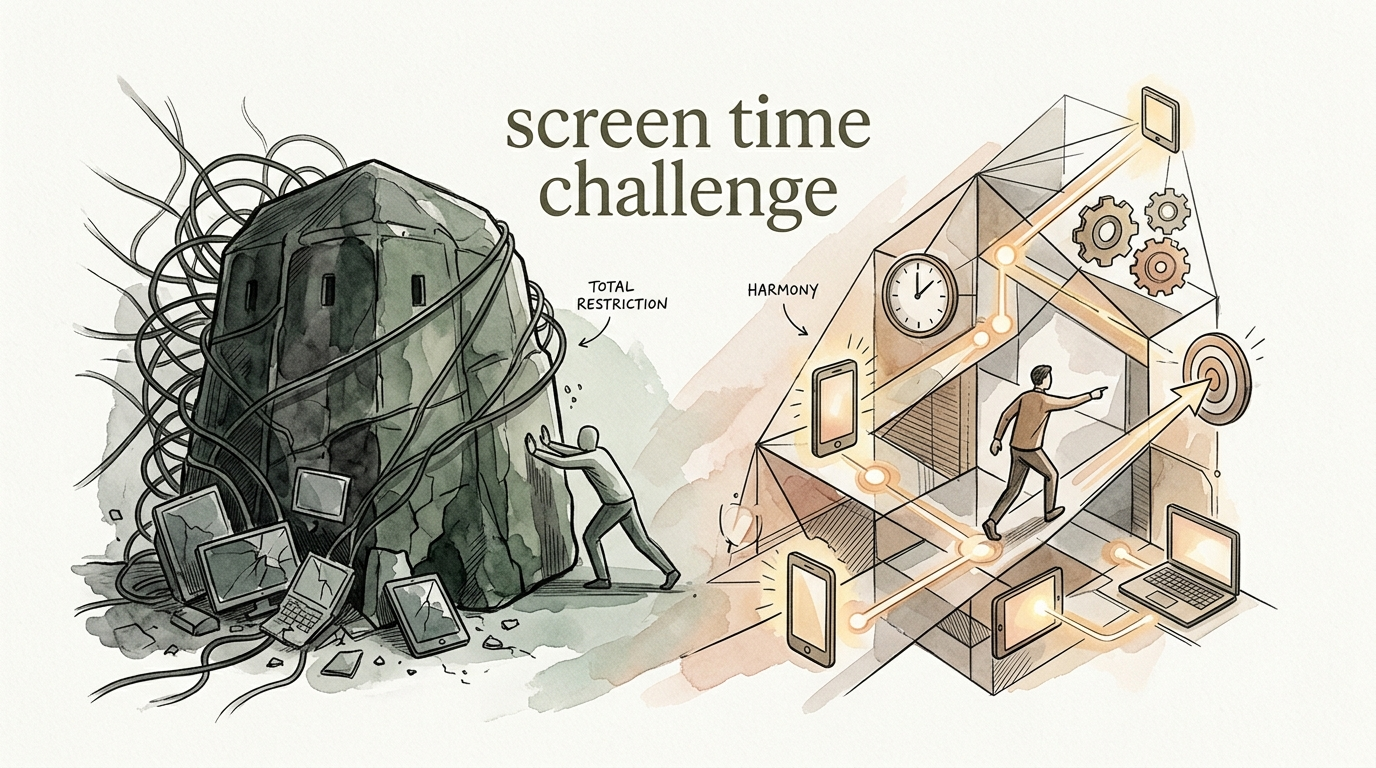
But here is the truth: stopping cold turkey usually fails. Total bans lead to a “rebound effect” where you binge even harder later. You don’t need a wall; you need a blueprint.
The Precision Schedule is that blueprint. It moves you away from “counting minutes” and toward “valuing moments.” Let’s break down how to master the screen time challenge and reclaim your focus.
screen time challenge
A screen time challenge is a structured, time-bound commitment to changing your relationship with digital devices. It isn’t just about using your phone less. It’s about being intentional with every second you spend in front of a glowing rectangle.
In 2026, the average adult spends over 6 hours and 37 minutes on screens daily. For teenagers, that number spikes to a staggering 8 hours and 39 minutes. We are spending more time in the “digital ecosystem” than we are in the real world.
The challenge exists to reset our baseline. It’s used by professionals to beat burnout, by students to regain their attention spans, and by parents to model healthy behavior for their children. It turns “mindless scrolling” into “meaningful engagement.”
Think of it like a digital diet. You wouldn’t stop eating entirely to lose weight; you would choose better food. A screen time challenge teaches you to choose better “digital calories.”
How to Build Your Precision Schedule
The Precision Schedule is the heart of a successful screen time challenge. It replaces the “blanket ban” with a surgical approach to tech use. Follow these steps to build yours.
1. The Awareness Audit
You cannot change what you do not measure. For the first three days, change nothing. Just watch. Use your phone’s built-in “Screen Time” or “Digital Wellbeing” tools to see exactly where the time goes.
Look for the “pickup” count. Most people pick up their phones over 100 times a day. Identify your “Time Vampires”—the apps that you open for two minutes but stay on for forty.
2. Categorize Your Usage
Not all screen time is created equal. Divide your usage into three buckets:
- Utility: Banking, navigation, work emails, and 2FA. These are tools.
- Connection: High-quality video calls with family or focused study groups.
- Consumption: Social media, short-form video, and endless news scrolling. This is where the precision is needed.
3. Define Your “Deep Work” and “Deep Rest” Zones
Create windows in your day where screens are strictly forbidden. This is your Precision Schedule. For example, the “1-1-1 Rule”: No screens for the first hour of the day, no screens during meals, and no screens one hour before bed.
4. Implement Digital Friction
Willpower is a finite resource. Don’t rely on it. Move your most addictive apps off your home screen. Better yet, delete them and only access them via a web browser. The extra steps create “friction” that stops the reflexive tap.
The Benefits of Reclaiming Your Time
When you master the screen time challenge, the rewards are immediate and measurable. You aren’t just gaining time; you are gaining mental clarity.
Improved Sleep Quality: Blue light from screens suppresses melatonin. By following a Precision Schedule that cuts screens an hour before bed, you fall asleep faster and reach deeper REM cycles. You wake up feeling refreshed, not “hungover” from late-night scrolling.
Restored Attention Span: Our brains have been trained for 15-second dopamine loops. A screen time challenge retrains your prefrontal cortex. You’ll find you can read a book, finish a project, or hold a conversation without the itch to check your pocket.
Reduced Anxiety and “Comparisonitis”: Social media is often a “highlight reel” of everyone else’s life. Cutting back reduces the constant, subconscious comparison that leads to feelings of inadequacy. Real life starts to look a lot better when you aren’t comparing it to a filtered version of someone else’s.
Physical Health Gains: Less time sitting in a “tech neck” posture means fewer headaches and less back pain. Many people find they naturally move more once the “digital tether” is loosened.
Challenges and Common Mistakes
The road to digital minimalism is paved with good intentions and frequent “relapses.” Knowing the pitfalls helps you avoid them.
The “Cold Turkey” Trap
Many people try to go from 8 hours to 1 hour overnight. This almost always leads to failure. Your brain is physically accustomed to the stimulation. When you cut it off entirely, you experience actual withdrawal symptoms—irritability, restlessness, and boredom.
The “Empty Space” Problem
If you take away 3 hours of scrolling but don’t have a plan for that time, you will fill it with… more scrolling. You must have a “replacement activity” ready. Keep a book on your nightstand. Have your gym shoes by the door. If you don’t fill the void, the phone will.
The “Just One Quick Check” Lie
We tell ourselves we are just checking the weather or a single message. Ten minutes later, we are deep in a comment section. This is called “habit chaining.” One digital action triggers the next. Recognizing this chain is the only way to break it.
Limitations and Realistic Constraints
While the goal is to reduce use, we must be realistic. Total disconnection is rarely an option in 2026.
Work Requirements: If your job requires you to be “on call” or manage social media, a blanket ban is impossible. In these cases, the Precision Schedule is your only defense. You must designate “work-only” devices or use app blockers that only allow professional tools during business hours.
Social Obligations: We use our phones for coordination. Group chats for sports, school, and family events are the “modern town square.” The challenge is to use these for coordination, not distraction.
The Digital Ecosystem: Many essential services—banking, parking, healthcare—are now app-based. You cannot be “anti-screen” in a world that requires them. The focus must remain on eliminating passive consumption while maintaining functional utility.
The Blanket Ban vs. The Precision Schedule
Understanding the difference between these two approaches is the key to long-term success. One is a temporary fix; the other is a lifestyle shift.
| Feature | The Blanket Ban | The Precision Schedule |
|---|---|---|
| Philosophy | Screens are the enemy. Remove them. | Screens are tools. Use them with intent. |
| Sustainability | Low. Usually lasts 3–7 days. | High. Can be maintained indefinitely. |
| Emotional Impact | Resentment, FOMO, and guilt. | Empowerment, focus, and calm. |
| Flexibility | None. All use is “failure.” | High. Adapts to work and life needs. |
| Result | Temporary detox followed by binge. | Permanent habit change. |
Practical Tips for Instant Results
You don’t need to wait until Monday to start. You can make these small adjustments right now to lower the “gravity” of your phone.
- Go Greyscale: Modern apps are designed with bright, “candy-colored” icons to trigger your brain. Turning your phone to greyscale (in accessibility settings) makes the screen look boring. Your brain will naturally want to look away.
- The “Bedroom Ban”: Buy a cheap analog alarm clock. Charge your phone in the kitchen or living room. Removing the phone from the bedroom is the single most effective way to improve sleep and morning productivity.
- Audit Your Notifications: If it isn’t from a real human being (text, call, DM), you probably don’t need the notification. Turn off “likes,” “retweets,” and “news alerts.” They are just hooks to get you back into the app.
- Use the “One Sec” Rule: Use apps like One Sec or ScreenZen that force you to take a deep breath before an app opens. That short pause is often enough to break the impulsive habit.
Advanced Considerations: The Dopamine Loop
To truly master the screen time challenge, you need to understand what you are up against. You are fighting against teams of engineers who are paid to keep you engaged.
Most addictive apps use a “Variable Reward Schedule.” This is the same mechanism used in slot machines. You scroll because you might find something interesting next. This keeps your dopamine levels in a state of constant, low-level agitation.
Advanced practitioners of the screen time challenge focus on “Dopamine Fasting”—periods where they avoid all high-stimulation activities to “reset” their brain’s sensitivity. When your dopamine levels stabilize, “boring” activities like walking or reading suddenly become deeply enjoyable again.
In 2026, the American Academy of Pediatrics (AAP) updated its “media balance” model. They now emphasize that quality and context are more important than the raw number of minutes. A Precision Schedule aligns with this modern science by prioritizing high-value digital engagement over passive consumption.
Real-World Scenarios
Scenario A: The Overwhelmed Student
Jake is a college student spending 9 hours a day on his phone. His grades are slipping. He starts a 30-day challenge using a Precision Schedule. He allows himself 1 hour of “social time” in the evening but locks his phone in a timed locker during study hours. Within two weeks, his “Deep Work” capacity increases from 15 minutes to 90 minutes. He finishes his semester with a higher GPA and less stress.
Scenario B: The Remote Worker
Sarah feels like she is “always on.” Work pings her at 9 PM, and she can’t stop checking her email. She implements a “Hard Stop” at 6 PM. Her phone goes into a drawer, and she only uses a tablet with no work apps for evening entertainment. Her “phantom vibration” syndrome disappears, and her relationship with her partner improves because she is actually present during dinner.
Scenario C: The Tech-Forward Parent
Mark and Elena noticed their kids were throwing tantrums when the iPad was taken away. Instead of a blanket ban, they created a family Precision Schedule. Screens are for “Creation” (coding games, making videos) during the week and “Consumption” (movies, gaming) only on Saturday mornings. The tantrums stop because the kids know exactly when and why they can use tech. The “mystery” and the “addiction” are replaced by a schedule.
Final Thoughts
The screen time challenge is not about hating technology. Technology is a miracle. It gives us the world’s information in our pockets. But a tool that you cannot put down is not a tool; it is a tether.
By moving from a “Blanket Ban” to a “Precision Schedule,” you stop fighting your devices and start managing them. You create space for the things that actually matter: deep work, real-world relationships, and mental rest. Your time is the only truly non-renewable resource you have. Stop spending it on things that don’t love you back.
Start small. Turn your phone to greyscale today. Leave it in the other room tonight. Experience the “boredom” that leads to creativity. You’ll be surprised at how much life is waiting for you once you look up.
Sources
1 reddit.com | 2 demandsage.com | 3 healthychildren.org | 4 rootrisetherapyla.com | 5 thesuccessfinder.com | 6 monstermath.app | 7 edl.network | 8 understandtech.co.uk | 9 medium.com | 10 powerhouseplanners.com | 11 reddit.com | 12 forbes.com | 13 analogbag.net | 14 myhspediatrics.com